
Blog
How to Turn Your Blog into an Ebook in 2025 (with Free Content Audit Template and Checklists)
Are you thinking of turning your blogs into an ebook, but don’t know where to start?
You are not alone.
Picking the right blog posts and converting them into an ebook is a lot of work, especially if you are a busy blogger or a marketer.
So, I created this step-by-step guide to help you save time and achieve your goals.
Step 1: Set Your Ebook Goal and Pick the Right Blogs
Goal Setting
Set a goal for your ebook, aligning with your content marketing goal. It may be:
* Lead generation
* Revenue generation
* Enhancing authority
* Boosting website traffic
Or just a fresh content addition to your pipeline.
So, for example, if you are seeing a dip in your website traffic, consider launching an ebook on your website. This will boost the site visits.
Perform a Content Audit
A proper content audit will help you select those blog posts that build a narrative.
So, take your time and analyze all your blog posts using a Google or Excel Sheet.
* List top-performing blogs
* Filter posts that can be grouped
* Identify topics your audience prefers
You will likely get 10-15 blog posts.
Now, select those with higher engagement and a common theme. For example, 2 blogs on upskilling, 2 blogs on free courses…and so on.
If it builds a narrative, say, _free courses for Instagram marketing skill_ s, they are perfect.
Tip: Prioritize evergreen, high-value blogs like Step-by-Step Guides and How-Tos
Step 2: Organize and Write Your Ebook
Select Your Ebook Format
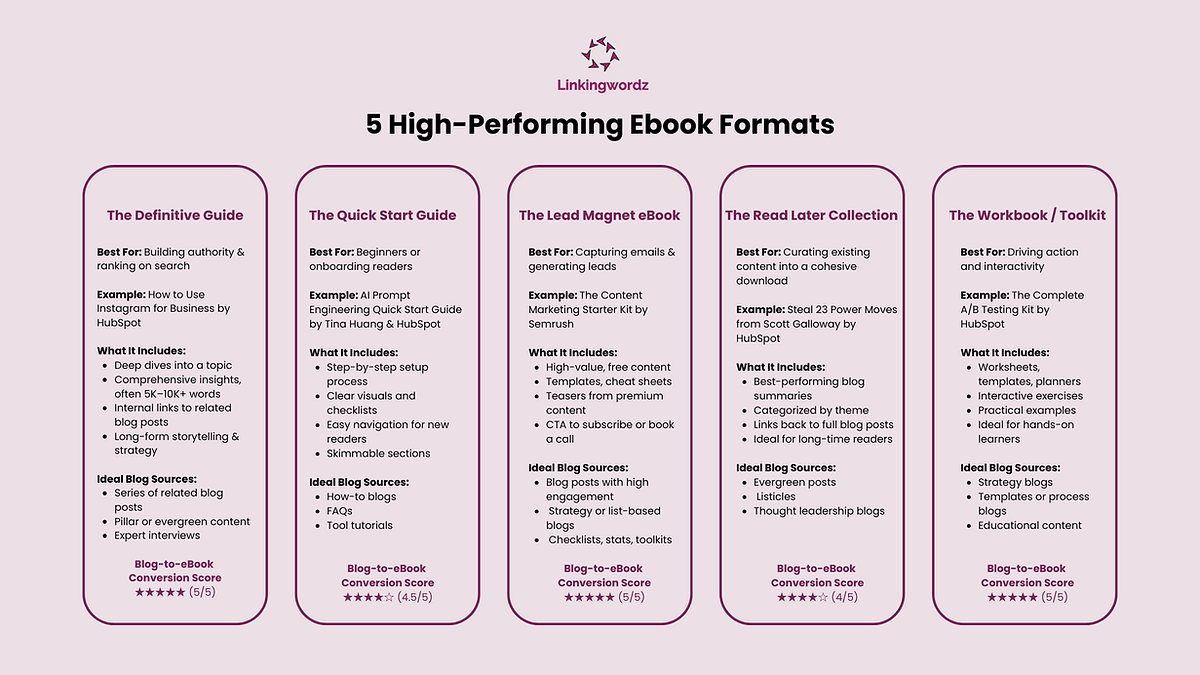
Once you have identified your blog posts, pick an ebook format that aligns with your goal.
For example, if your goal is **lead generation**for an Instagram marketing service, create a **lead magnet**on Instagram marketing.
Other ebook formats to explore are:
● Definitive Guide
● Quick Start Guide
● Read Later Collection
● The Workbook or Toolkit
Plan Your Ebook Structure
Create an ebook content structure before you start writing. This involves:
* Organizing the essential pages (such as the cover page, preface, table of contents, and author bio)
* Outlining the chapter framework
* Planning unique value-add elements (like checklists or infographics)
* Defining a Call to Action (CTA) that aligns with your content marketing goals
and more.
If you are not sure how to get started, download [free ebook templates](https://www.visme.co/templates/ebooks/)related to your niche and customize the structure.
Write the Draft
Begin by arranging your blog posts’ content chapter-wise.
Don’t just copy-paste.
You have to rewrite and refine each blog post's content to fit the narrative.
Since this is a blog-to-ebook conversion, you have to add transitional elements between the chapters for better readability.
A simple way to identify where to add these transitional elements is to ask yourself:
1. What might the reader ask after this chapter?
2. Should I address it in this chapter or next?
3. What would they want to know more about?
As you add these transitions, your chapters will connect and build the narrative.
Proofread and Edit
Target to finish your final draft in 2-3 weeks and then take a couple of days off to reset before editing.
Alternatively, you can hire a [professional editor](https://www.linkingwordz.com/contact) specialized in your ebook topic.
If you are editing it yourself, get these key areas right:
* Structuring the reader’s journey
* Ensuring each chapter has a stand-alone value
* Removing blog-specific elements (like “read more”)
* Maintaining a consistent tone, style, and vocabulary
* Removing repetitive content
* And, deleting non-evergreen elements (e.g., stats, pricing)
_Tip: Stick to a word count range of 3000-6000 words_
Add Visual Elements
Inserting visual elements and maintaining a consistent design language will keep your readers hooked.
You can use free or paid templates to design your ebook. But don’t use the exact theme and colors.
You have to customize it according to your brand design.
To customize, you can add infographics, diagrams, templates, or checklists.
So, for example, if you are talking about _audience growth comparison_ in your ebook, use a branded bar graph as a visual.
In case you are short on infographics or diagrams, use copyright-free images or AI-generated images for consistency.
Design Your Ebook Cover
Your ebook cover is the first thing your readers notice. So, plan your cover page aesthetics strategically.
If you are new to design, start with [Canva](https://www.canva.com/create/book-covers/)or try any other free design tools. They offer ready-to-use ebook cover templates to get you started.
Make It Reader-Friendly
Great ebooks aren’t only about the content but also the reading experience.
Clean, consistent, and standard formatting makes your ebook easier to read.
Here’s how you can enhance your reader’s journey:
* Use uniform fonts, sizes, and colors
* Keep consistent section lengths
* Break texts for white space
* Optimize for all devices
When you have polished formatting, your readers are more likely to stick to the last page and even take action!
Discussion
Join the conversation